

Why most voice AI contact center pilots sound robotic
Most voice AI pilots impress in a controlled demo and disappoint on a real call. The agent answers, but there's a beat of silence before every reply — just long enough that the caller starts to wonder if the line dropped. It feels less like a conversation and more like talking to a satellite.
That awkward pause isn't a model problem or a prompt problem. It's latency — the total time between the caller finishing their sentence and the agent starting to speak. The stakes are real: Gartner projects conversational AI will cut $80 billion from contact center labor costs by 2026, but only for deployments callers actually stay on the line for. In a contact center, latency is the single thing that decides whether callers stay or hang up, and it's almost entirely an architecture question.
A voice agent can be brilliant and still fail, if it's slow. In a live call, the delay is the experience.
Get the architecture right and the agent feels natural. Get it wrong and no amount of prompt tuning saves it. So the useful place to start isn't which platform to buy — it's understanding the pipeline every voice agent runs on.
The four-stage pipeline every voice agent runs
Under the hood, almost every voice AI agent runs the same loop. Knowing the four stages is what lets you find where the delay comes from.
First, telephony carries the caller's voice into your system and the agent's voice back out. Second, speech-to-text (also called STT or ASR) turns the caller's spoken words into text. Third, the language model reads that text and works out what to say. Fourth, text-to-speech (TTS) turns the model's reply back into spoken audio, which telephony sends back to the caller. Voice in, text, thinking, text, voice out — then round again for the next turn. Every one of those four stages takes time, and their combined delay is what the caller experiences as lag.
Latency is a budget, and every stage spends it
Here's the simplest way to understand how voice AI architecture works. You have a fixed amount of time to reply before the conversation feels unnatural, and every stage in the pipeline spends part of it.
A natural phone conversation leaves only about 200 milliseconds of gap before a pause feels wrong. Your whole pipeline has to fit inside that.
Think of it as a budget. The human ear expects a reply almost immediately — a landmark study across ten languages found the natural gap between speakers sits around 200 milliseconds, and much beyond that starts to feel off. Push past about a second and callers begin talking over the agent, assuming it didn't hear them. Your four stages have to share that budget between them, which is why streaming matters so much: instead of waiting for the caller to finish, then transcribing the whole thing, then thinking, each stage starts working on partial input as it arrives. Without streaming, the delays stack end to end and blow the budget before the model has said a word. Staying under budget is the core engineering challenge of voice AI, and it drives almost every other decision.
Chained vs speech-to-speech: the architecture choice
There are two ways to build the pipeline, and choosing between them is the biggest architecture decision you'll make. Neither is simply better — they trade off against each other.
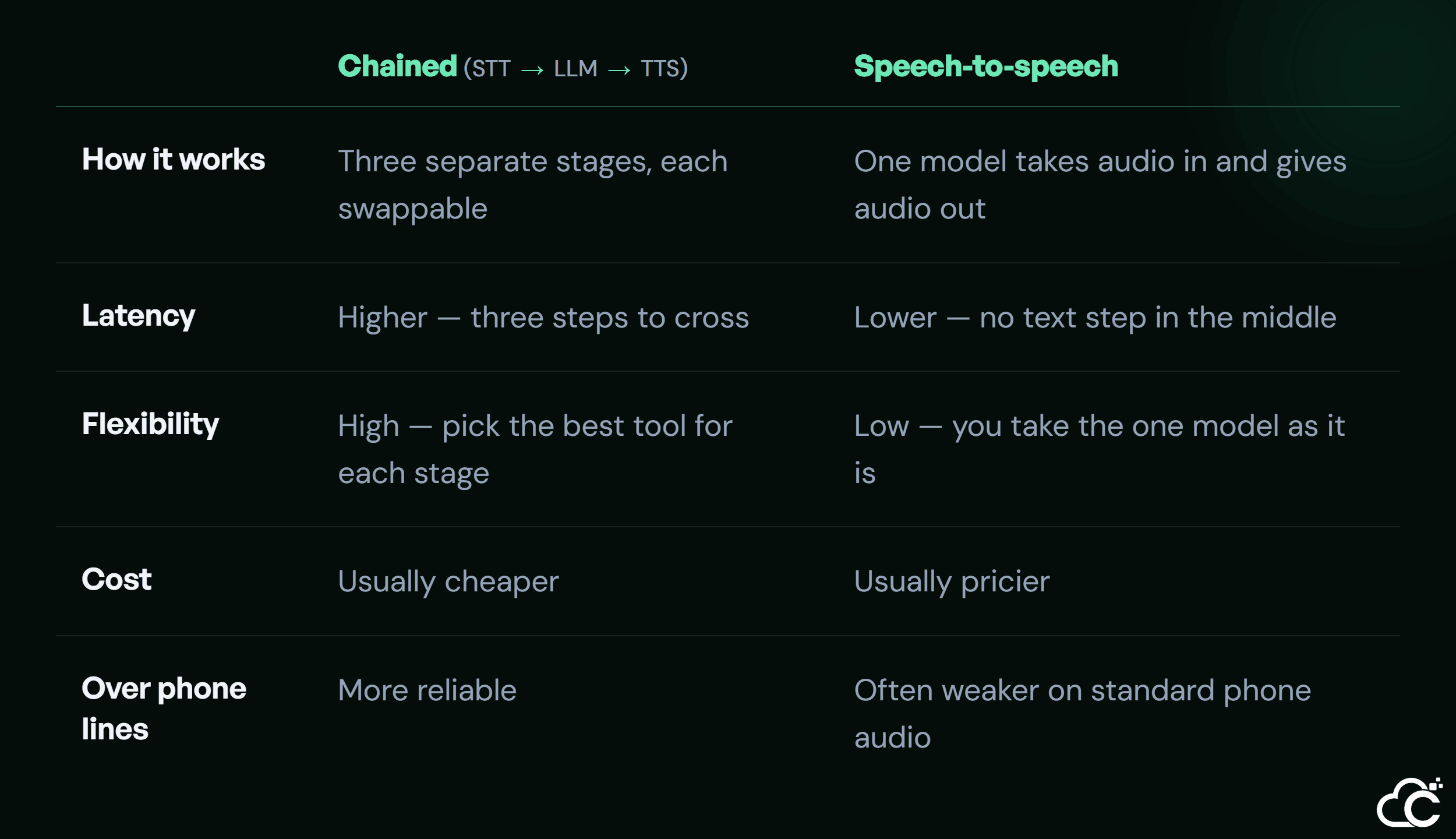
The chained approach wires together a separate speech-to-text, model, and text-to-speech, which gives you control over each and tends to work better over ordinary phone lines. The speech-to-speech approach uses a single model that hears audio and speaks directly, cutting latency by removing the text step, but at higher cost and often weaker performance on phone-quality audio. For most contact center deployments over the phone network, the chained approach remains the safer, more controllable choice — but the gap is closing.
Why phone-call audio hurts voice AI accuracy
This is the problem almost no platform comparison mentions, and it catches teams by surprise in production. Phone audio is lower quality than the audio these AI models expect.
Most speech-to-text models are trained on clean, high-quality audio. But the standard telephone network carries voice at a much lower quality than that — it was built decades ago for human ears, not AI models. When you feed that thinner phone audio into a model trained on crisp recordings, its accuracy drops, and the agent starts mishearing callers. This is why a voice agent that tests perfectly on your laptop microphone can struggle the moment it's answering real phone calls. The fixes are technical — using telephony and models tuned for phone-quality audio — but the first step is simply knowing the problem exists before it surprises you in production.
Integration: connecting to your CRM and human agents
A fast, accurate agent is useless if it can't connect to your systems. What makes voice AI useful in a contact center is how well it plugs into the rest of your operation.
Three connections matter most. The agent needs to route the call and its data into your CRM , so every conversation is logged and the caller's history is available in real time. It needs a clean handoff to a human agent when a call goes beyond what it should handle — passing the full context so the caller never has to repeat themselves. And it needs to fit alongside your existing contact center software rather than replacing it. Handled well, the voice agent becomes one channel in a unified view of the customer, not an island that creates a second set of records nobody trusts.
What to measure once it's live
Once the agent is answering real calls, a few numbers tell you whether it's working. Watching the wrong ones hides problems until customers complain.
Track end-to-end latency, and watch both the typical case and the slow tail, because it's the occasional long pause that callers remember. Measure containment rate — the share of calls the agent resolves without a human — since that's the return on the whole investment. Watch the handoff rate and whether context passes cleanly when it does. And keep an eye on transcription accuracy, because a small drop there quietly poisons everything downstream. Building this properly takes the engineering to make it hold up in production , not just a working demo.
Conclusion
Deploying voice AI in a contact center isn't about picking the platform with the best marketing. It's about understanding the architecture underneath — the four-stage pipeline, the latency budget every stage has to share, the honest trade-off between chained and speech-to-speech, and the phone-audio problem that trips up teams who skip it. The deployments that feel natural and stay on the line are the ones built latency-first and integrated properly into the CRM and the human team. Building that way from day one is far easier than fixing it later, and our team will design the architecture with you before you go live.