
Why AI infrastructure cost is so hard to control
AI agents have an awkward usage pattern for infrastructure. They run in spikes. A rush of activity arrives with each request, then nothing until the next one. Traffic comes and goes and is hard to predict, which makes it hard to size the servers behind it.
The usual approach is to run always-on servers big enough for the busy moments. But that means paying full price around the clock for capacity you only use part of the time. During every quiet stretch, those servers sit idle and still cost money. For a workload that spends much of its day waiting, that idle time is the biggest source of wasted AI spend.
The problem with AI infrastructure isn't the cost of running agents. It's the cost of paying for servers while the agents sit idle.
Serverless is built for exactly this shape of problem, which is why it has become a core pattern for running AI cost-effectively.
What serverless actually means for AI
Serverless doesn't mean there are no servers. It means you don't manage them. You give the cloud provider your code, and it runs that code on demand, handling all the servers behind the scenes. You pay only for the time your code actually runs.
The part that matters for AI is scale-to-zero. When nothing is happening, a serverless function uses no resources and costs nothing. When a request arrives, it starts up, does the work, and stops again. For an AI workload that runs on and off and sits idle much of the day, that model fits closely: you stop paying for all those quiet hours. Instead of renting a server by the month, you pay by the request.
Where serverless wins for AI agents
Serverless is strongest for the parts of an AI system that are short, stateless, and come in spikes — stateless meaning they don't need to remember anything between requests.
The clearest win is event-driven work: a task that fires when something happens, runs briefly, and stops. It also fits the orchestration layer of an agent well — the routing, request handling, and tool dispatch that coordinate the work but don't do the heavy thinking themselves. Light inference tasks, like classification or short text processing, run well too. And background jobs that don't need an instant response are a natural fit, because a small startup delay doesn't matter when nobody is waiting on the result. For all of these, getting the GenAI engineering to architect it well is what turns the cost model into real savings.
Where serverless quietly costs more
Here's the honest half most guides skip. Serverless is not always cheaper, and using it for the wrong workload creates new problems.
The first is the cold start. When a function has been idle and a new request arrives, it has to start up and load everything it needs into memory, which for an AI model can take several seconds. For a background task, that delay is fine. For a real-time chat where a person is waiting, several seconds of silence is unacceptable. The second problem is time limits: serverless functions are usually capped at a few minutes of run time, so a long, multi-step agent task can be cut off mid-run. The third is the cost crossover, and it's the one that surprises teams.
Once an agent is busy most of the day, paying per request costs more than renting a dedicated server. Past roughly 40% usage, always-on becomes the cheaper choice.
So the pay-per-use model that saves money on a quiet workload starts losing money on a constantly busy one.
Serverless vs always-warm: which fits which workload
The choice isn't serverless or nothing. It's serverless versus always-warm infrastructure, and each fits a different traffic shape.
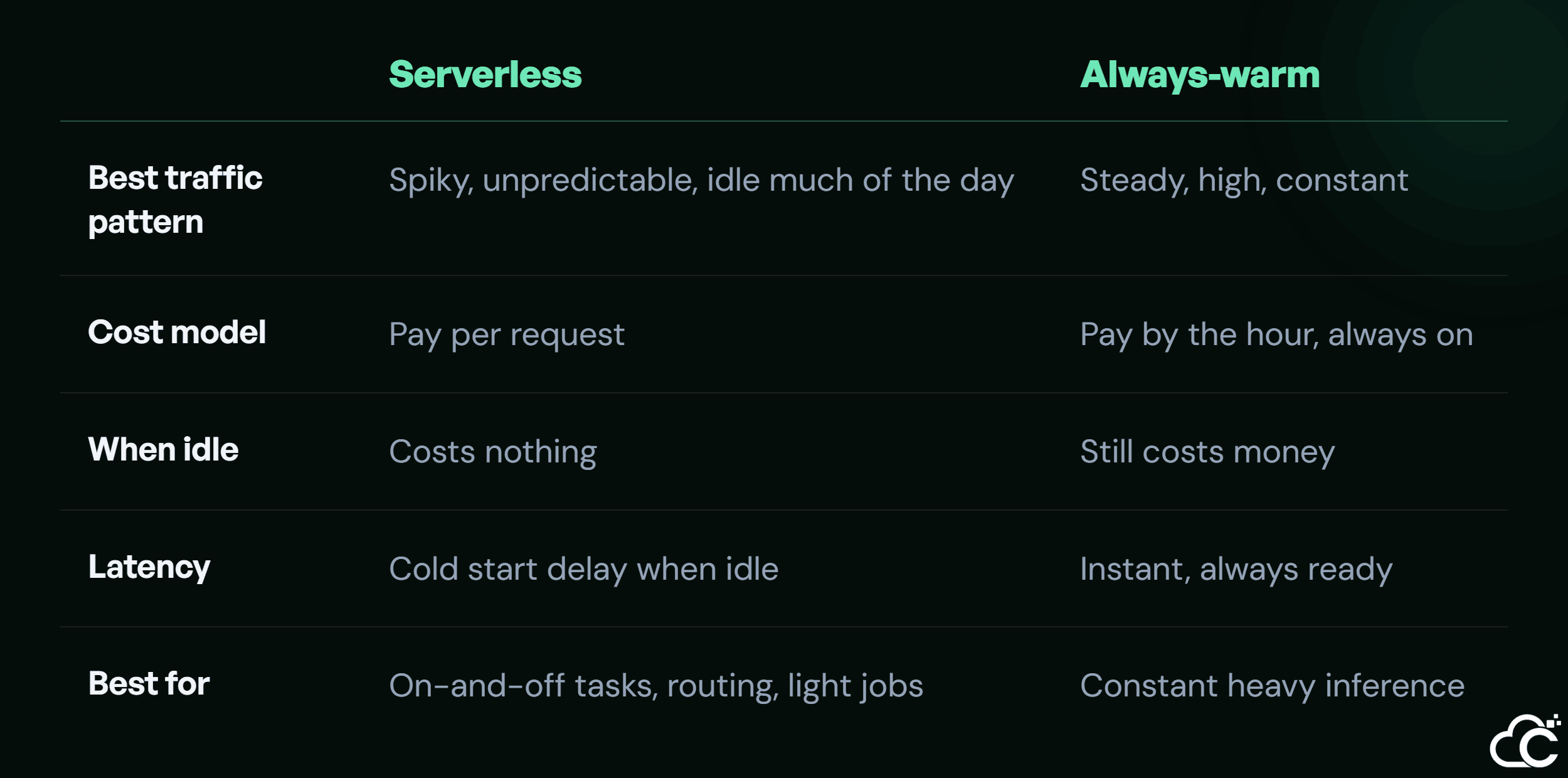
Read across and the rule is clear. If a workload is busy most of the time, an always-warm server is cheaper and faster. If it's idle much of the day, serverless wins by charging nothing for the quiet hours. The mistake is forcing one model onto both kinds of work.
The pattern that actually works: layered
The best real-world setups don't pick one model. They use both, matched to each part of the system.
A common and effective pattern is to run the light, on-and-off parts on serverless and keep the heavy, constant parts always warm. The orchestration layer handles routing, requests, and tool dispatch. It runs on serverless, using no resources between spikes. The heavy model inference that needs to respond instantly and runs most of the day stays on a dedicated, always-warm server. This gives you the cost savings of serverless where the work comes and goes, and the speed of always-on where the work is constant. Getting this split right is where expert help optimizing your cloud costs saves the most money, because the savings come from matching each layer to its real usage.
How to decide for your own workloads
Turning this into a decision comes down to looking at each workload's shape. You don't need to guess.
For each part of your AI system, ask two questions: how spiky is the traffic, and how much of the day is it actually busy? Put the often-idle parts on serverless, where paying nothing during idle time is the big saving. Keep the constant, latency-sensitive heavy inference on always-warm infrastructure, where instant response and steady cost win. Then model the real monthly cost of each, including cold-start effects, rather than assuming serverless is always cheaper. When you're moving these workloads to the cloud the right way , this mapping is the step that decides whether the bill is efficient or wasteful.
Conclusion
Serverless is one of the best tools for running AI cost-effectively, but it's a tool for a specific shape of problem, not a universal answer. It shines when work comes and goes and sits idle often, turning wasted always-on cost into pay-only-when-you-run savings. It struggles when work is constant, where cold starts and the cost crossover make always-warm infrastructure the better choice. The teams that run AI cheaply at scale don't choose one model for everything. They layer both, matched to each workload's real usage. To do the same, start with how busy each of your AI workloads really is, then let us split them between serverless and always-on.