
The real question isn't which tool is best
Every "best automation tool" article gets the question wrong. There is no single winner, and any comparison that crowns one is selling something. The four options here each win for a different kind of team and a different kind of work.
The right automation tool isn't the most powerful one. It's the one that matches your team's skill, your volume, and how much thinking the work actually requires.
So the useful question isn't "which is best?" It's "which is right for this workflow, run by this team, at this volume?" The rest of this guide answers that.
The four contenders at a glance
Here's how the four stack up on the things that actually drive the decision. Pricing shifts often, so treat the figures as a 2026 snapshot and check each tool's current pricing page before you commit.
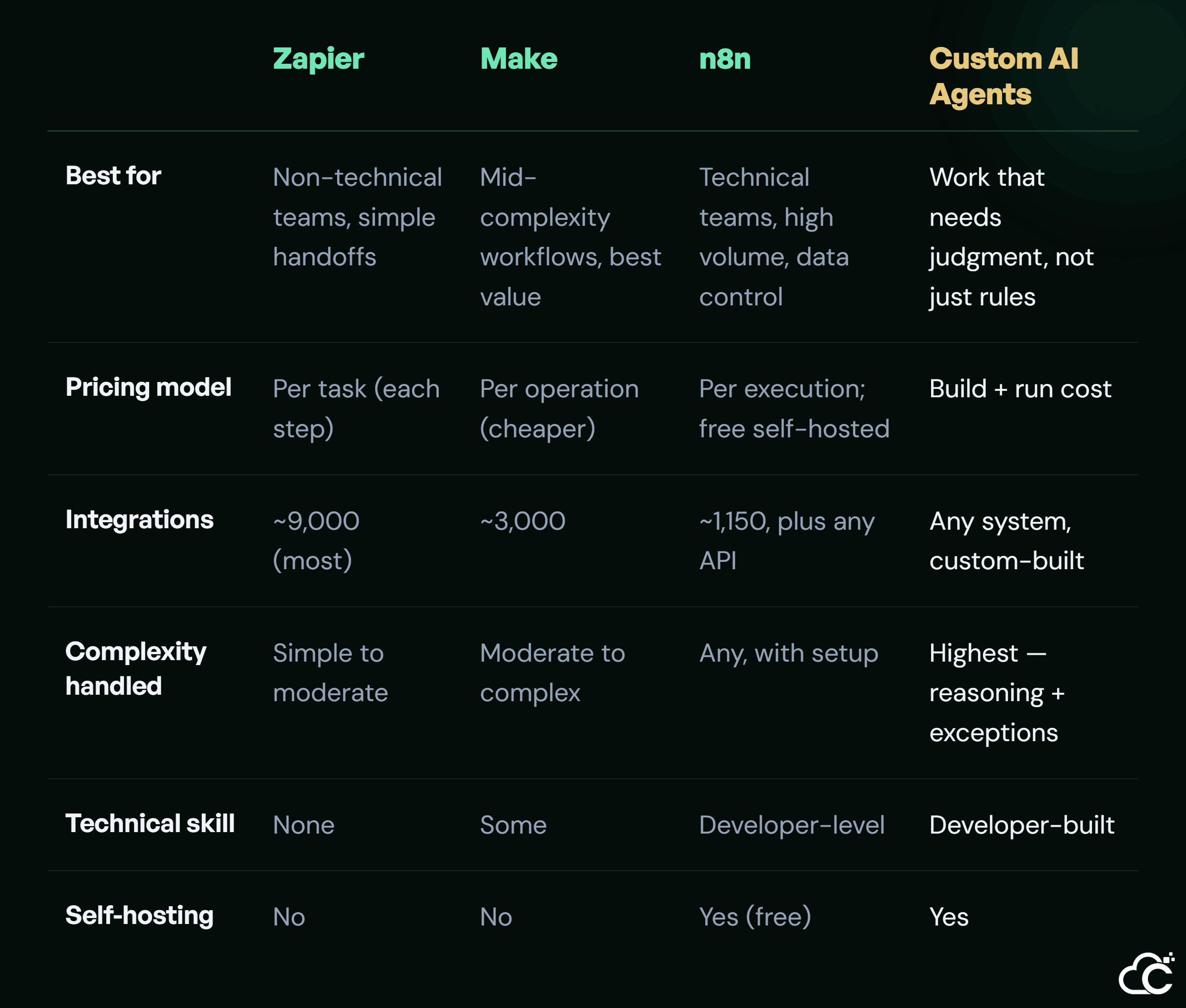
The pattern is clear: simplicity and cost trade off against power and control as you move left to right. Now the detail that the table can't hold.
Zapier: simplest, priciest at scale
Zapier is where most teams should start if nobody on the team codes. It has the largest integration library — close to 9,000 apps — and the gentlest learning curve. You can build a working automation in an afternoon.
The catch is the pricing. Zapier charges per task, and every step in a workflow counts as a task. A multi-step workflow running at volume burns through tasks fast, and the bill climbs into the hundreds of dollars a month. For simple, low-volume handoffs, that's fine. At scale, it hurts.
Make: the mid-complexity value pick
Make sits one step up in power and well below Zapier in cost. Its visual builder handles branching and loops that would need several separate Zaps elsewhere, and it charges per operation — often around ten times more operations per dollar than Zapier.
The trade-offs are a slightly steeper learning curve and no self-hosting. For a team that has outgrown Zapier's pricing but isn't ready for developer tooling, Make is usually the best-value middle ground.
n8n: power and control for technical teams
n8n is the pick when your team has technical skill and either high volume or strict data rules. It charges per execution — the whole workflow counts as one unit, no matter how many steps — which is far cheaper at scale. Self-hosted, the software is free, so you mostly pay for the server.
It also connects to any API even with a smaller pre-built library, keeps data inside your own infrastructure, and has the strongest built-in tools for AI workflows. The cost is setup: you need someone who can run and maintain it. For engineering-led teams, that's a fair trade, and it's a natural home for connecting your tools into automated workflows at scale.
Custom AI agents: when connecting isn't enough
The three tools above all do the same fundamental thing: they connect apps and follow rules you define. That covers most automation. But it has a ceiling, and it's worth naming where the ceiling is.
No-code tools connect and follow rules. AI agents reason and decide. The moment a workflow needs judgment, rules stop being enough.
A rule-based tool needs you to anticipate every path in advance: when X happens, do Y. A custom AI agent handles the cases no rule saw coming. It can read a messy email and decide how to route it, weigh an exception, or choose between options instead of following a fixed branch. That's the line. If your workflow is a predictable sequence, use a no-code tool; it's cheaper and faster. Custom agents earn their cost only when the work genuinely needs to reason, or when scale and complexity outgrow what no-code can handle. That's the zone for workflows that need to reason, not just react , and for automating end-to-end business processes that span many systems and decisions.
How to actually choose
You don't need a spreadsheet to decide. Three questions get most teams to the right answer.
First, how technical is your team? No coders points to Zapier or Make; developers unlock n8n. Second, what's your volume? Low volume makes Zapier's pricing painless; high volume pushes you toward Make or n8n. Third, and most important: does the work just need to connect things, or does it need to decide things? Connecting is a job for no-code. Deciding is where custom agents start to make sense. Answer those three honestly and the field narrows quickly.
Conclusion
There's no stack that wins for everyone in 2026, and anyone who tells you otherwise is pitching. Most teams should start with a no-code tool — Zapier for simplicity, Make for value, n8n for control — and only reach for custom AI agents when the work outgrows rules and starts needing judgment. The smart move is to match the tool to the job, not to buy the most powerful option and hope. To match the right tool to your own workflows, tell us what they need to do, and we’ll recommend the best fit, whether that’s Zapier, Make, n8n, or a custom agent.